
The research framework, on your own charts.
Five invite-only indicators that measure trend, drawdown, volatility, cross-asset momentum and the stock–bond hedge the way InvestWealth does: consistent rules, closed bars only, every table explained on hover. They describe where the market is; they do not predict where it goes.
- 5indicators, any symbol, any timeframe
- 0repainting: closed bars only
- 12months of access, no automatic renewal
- v6Pine Script, light and dark themes
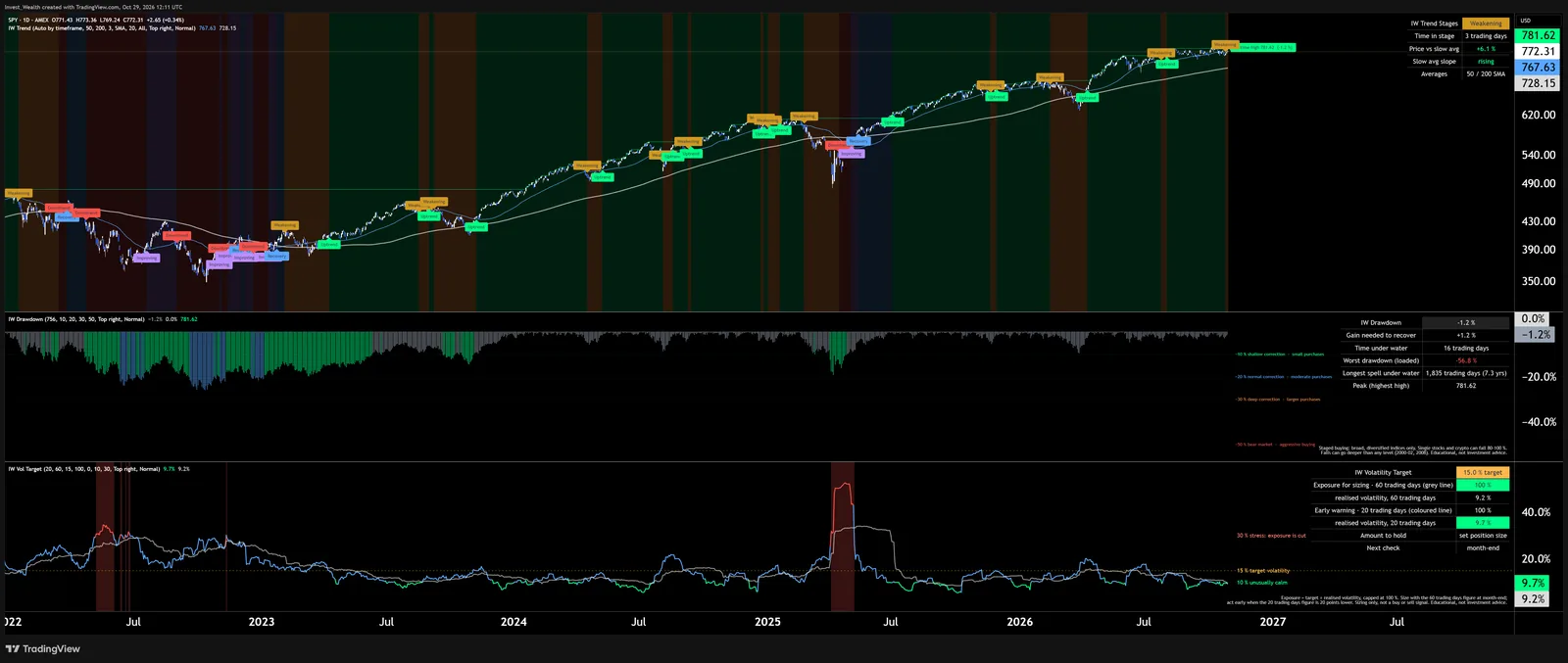
S&P 500 ETF, daily, January 2022 to October 2026, with Trend Stages, Drawdown & Recovery and Volatility Target. Charts by TradingView.
Each one answers one question.
IW Trend Stages
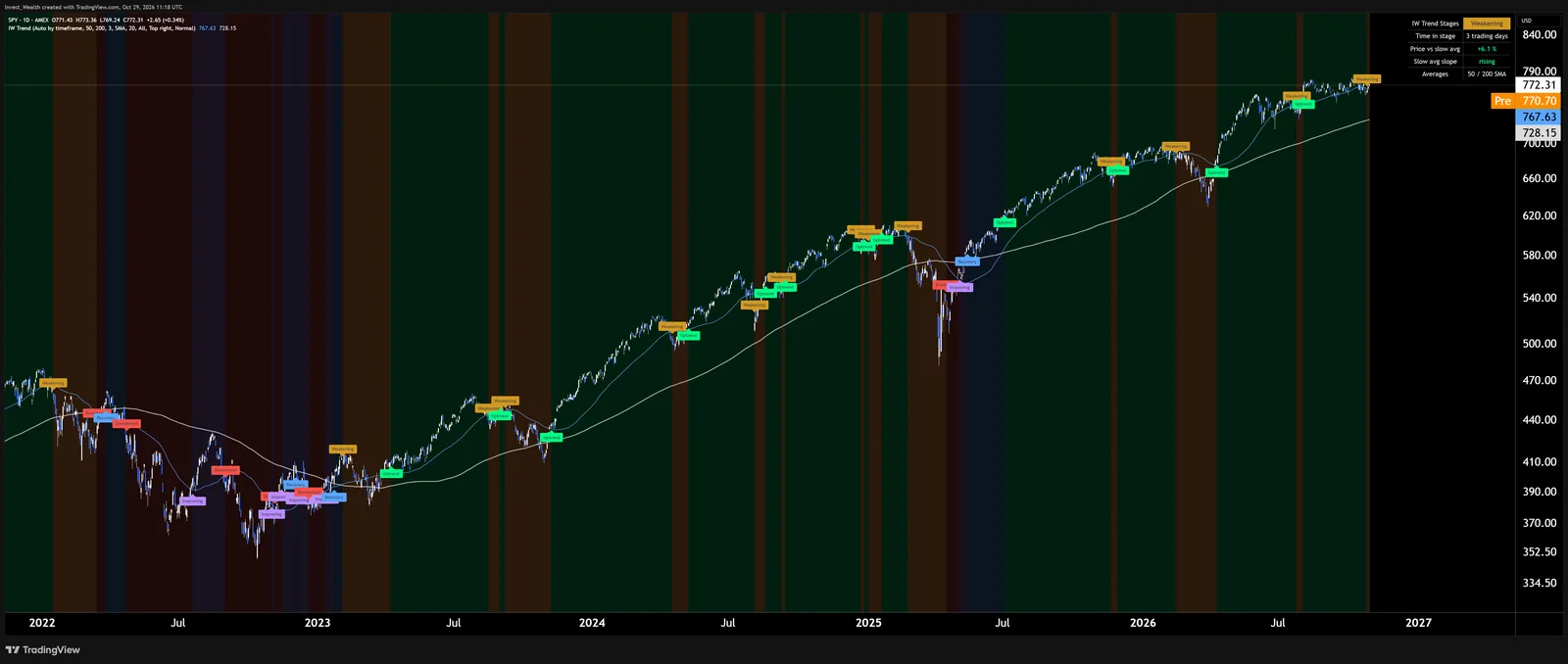
Five trend stages from two averages: Uptrend, Weakening, Downtrend, Improving, Recovery. Background colour, labels at each change, a table with the stage, how long it has lasted and the distance from the long-term average.
How to use it. Read the stage, not the price. In 2022 the S&P 500 ETF went green → amber → red, then purple and blue before the next green run. Lengths adapt to the chart timeframe; a stage change counts only after it has held three bars, so one-day dips do not flip it. Alerts on every stage change.
IW Drawdown & Recovery
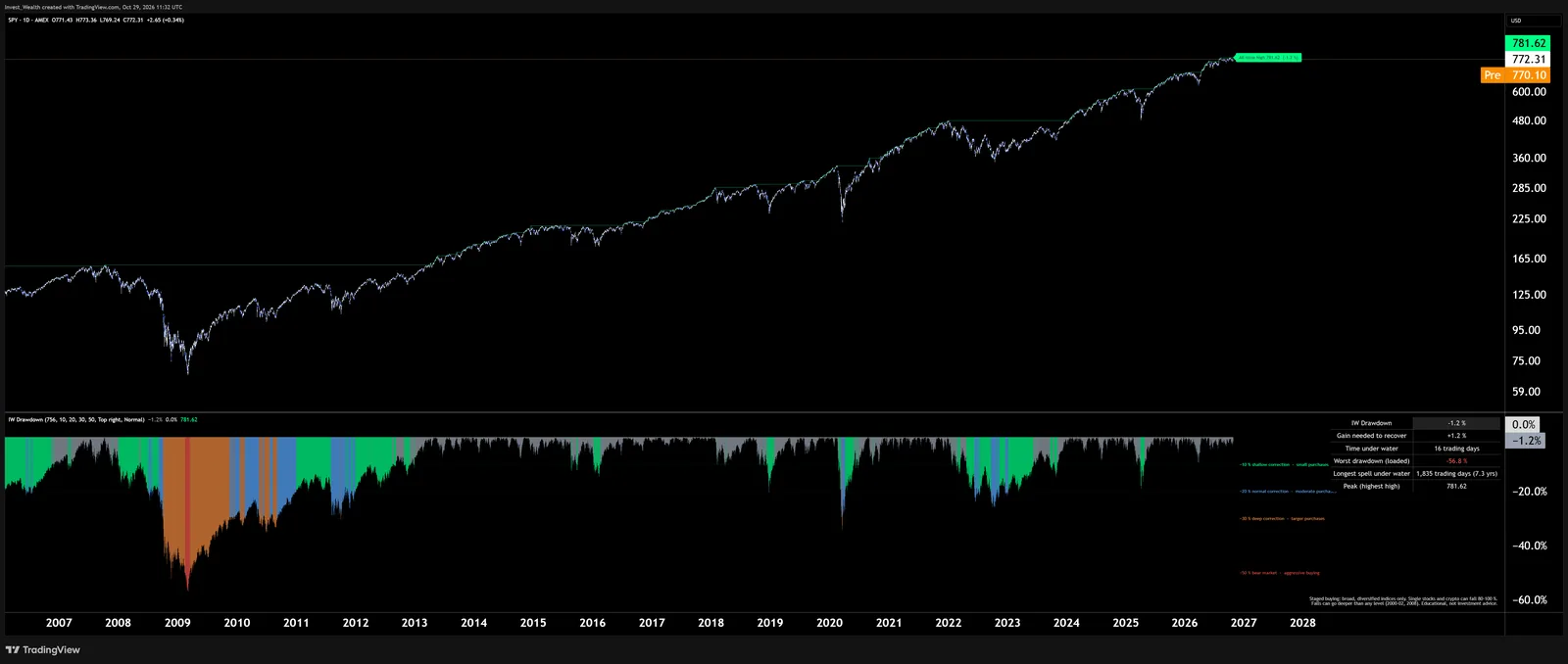
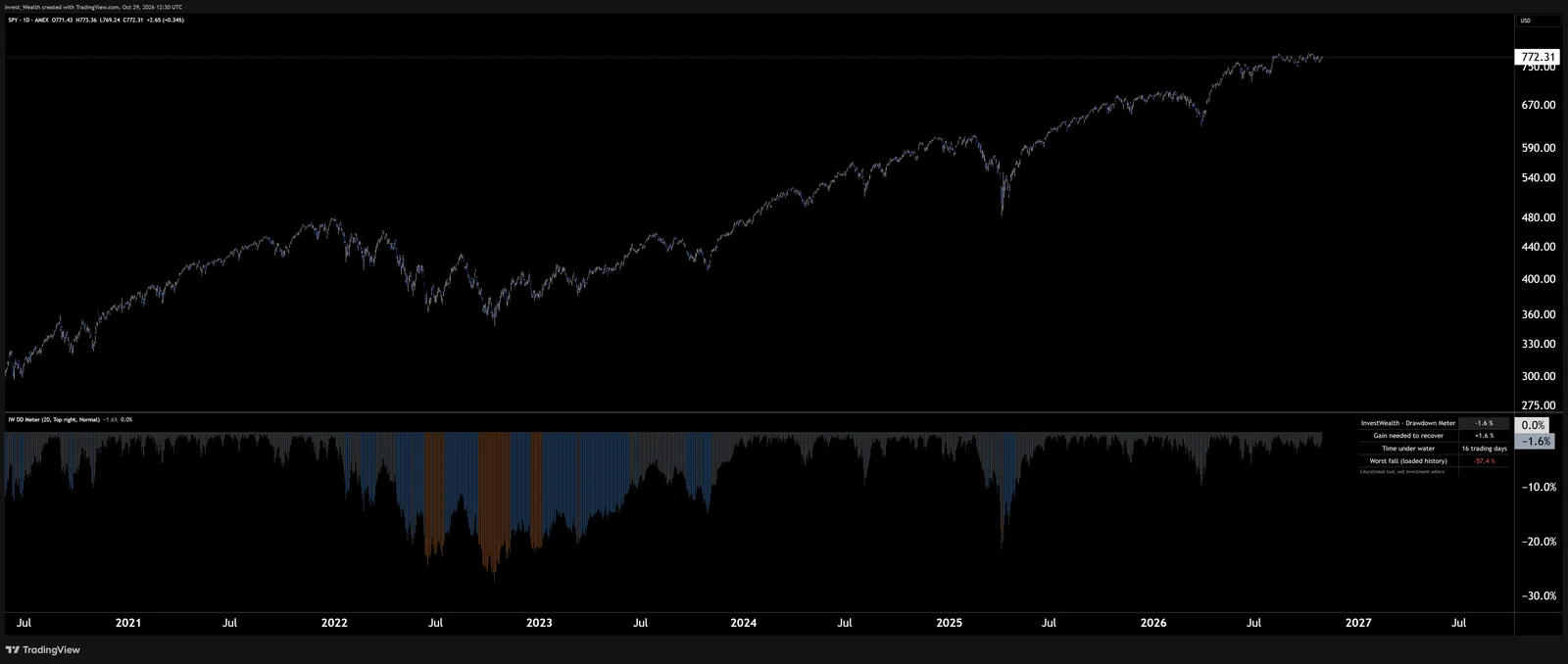
How far the market is below its high, the gain needed to recover, time under water, the worst fall and the longest spell in the loaded history. Four staged-buying thresholds (−10, −20, −30, −50 %) drawn as levels, each with an alert.
How to use it. The asymmetry most investors underestimate: −20 % needs +25 %, −50 % needs +100 %. The thresholds turn a fall into a plan written in advance; the alerts tell you when a level is reached, so you act on a rule instead of on the news.
IW Volatility Target
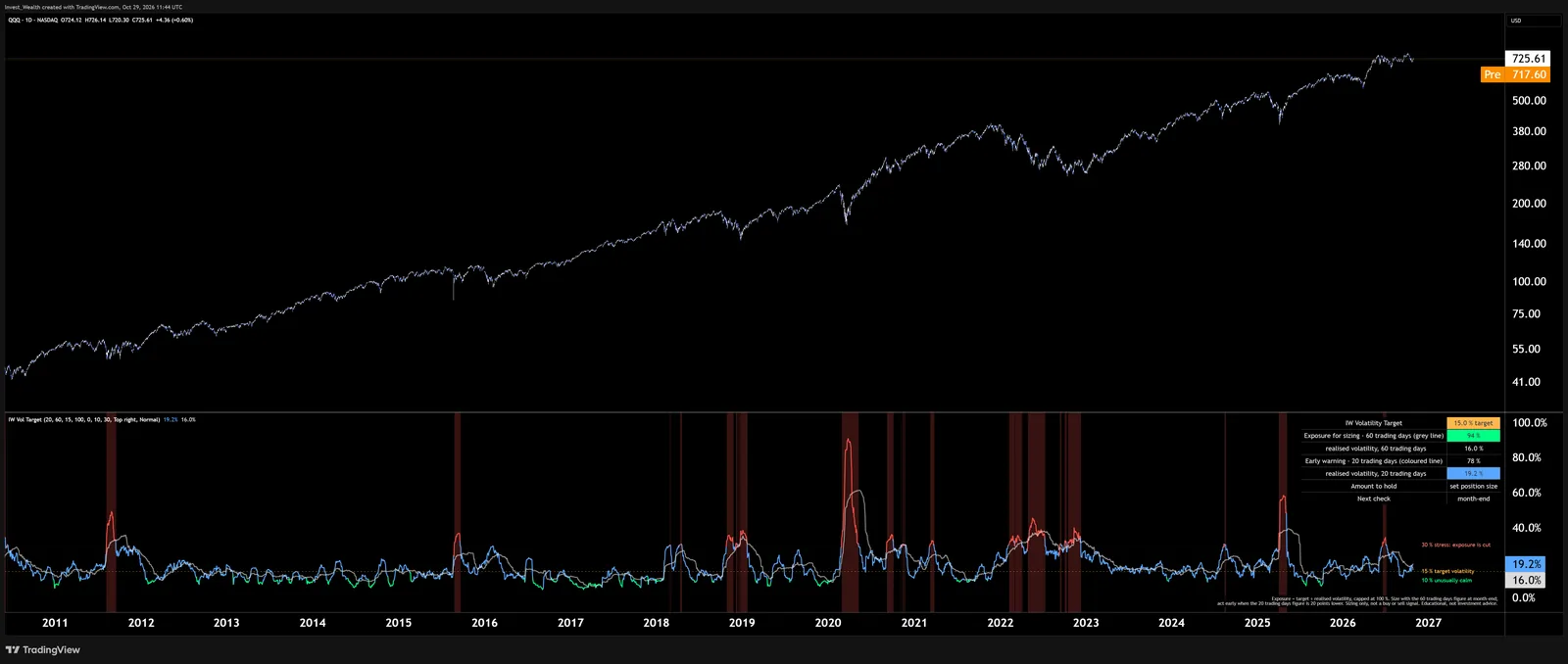
Realised volatility over two windows and the exposure a risk budget allows: target ÷ realised, capped at 100 %. The table says how much of the position to hold, in percent and in your currency, and when to check next.
How to use it. Size with the 60-day figure at month-end; the 20-day line is the early warning and flags "act now" when it falls 20 points below. March 2020: volatility 80 %, exposure 19 %. Calm 2017: 100 %. Hold less when the market is wild, more when it is calm; that is the whole rule, and it is the reason the Defensive, Balanced and Growth portfolios carry 10, 15 and 20 % targets.
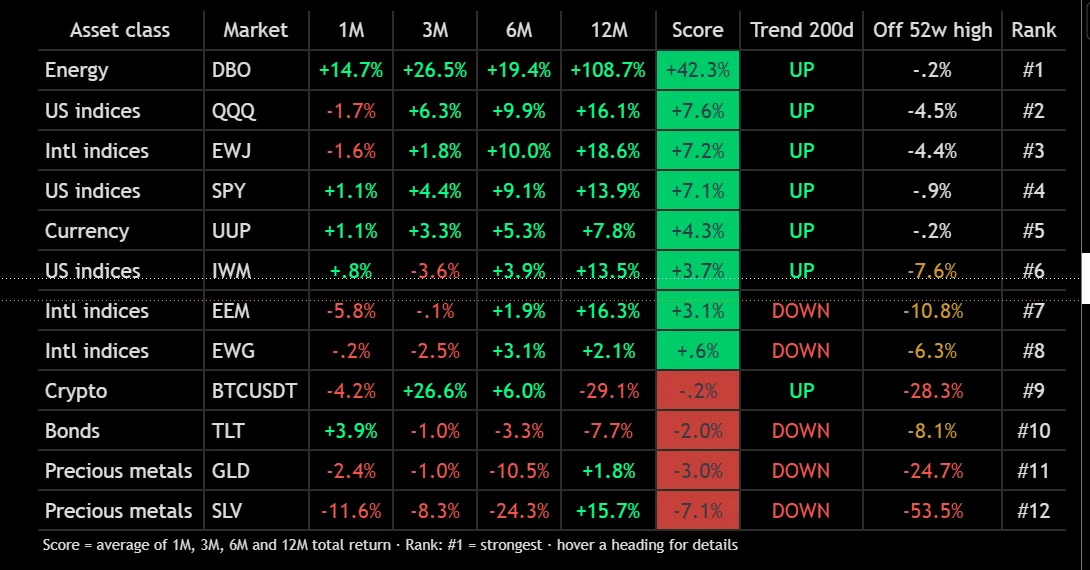
IW Cross-Asset Scoreboard
Twelve markets of your choice in one table: total return over one, three, six and twelve months, a momentum score, trend state, distance from the 52-week high and the rank. Rows are ordered by rank, #1 first.
How to use it. The weekly five-minute review: what leads, what lags, what is in an uptrend. The defaults cover US and international stocks, Treasuries, gold, silver, oil, the dollar and Bitcoin; swap any symbol in the settings.
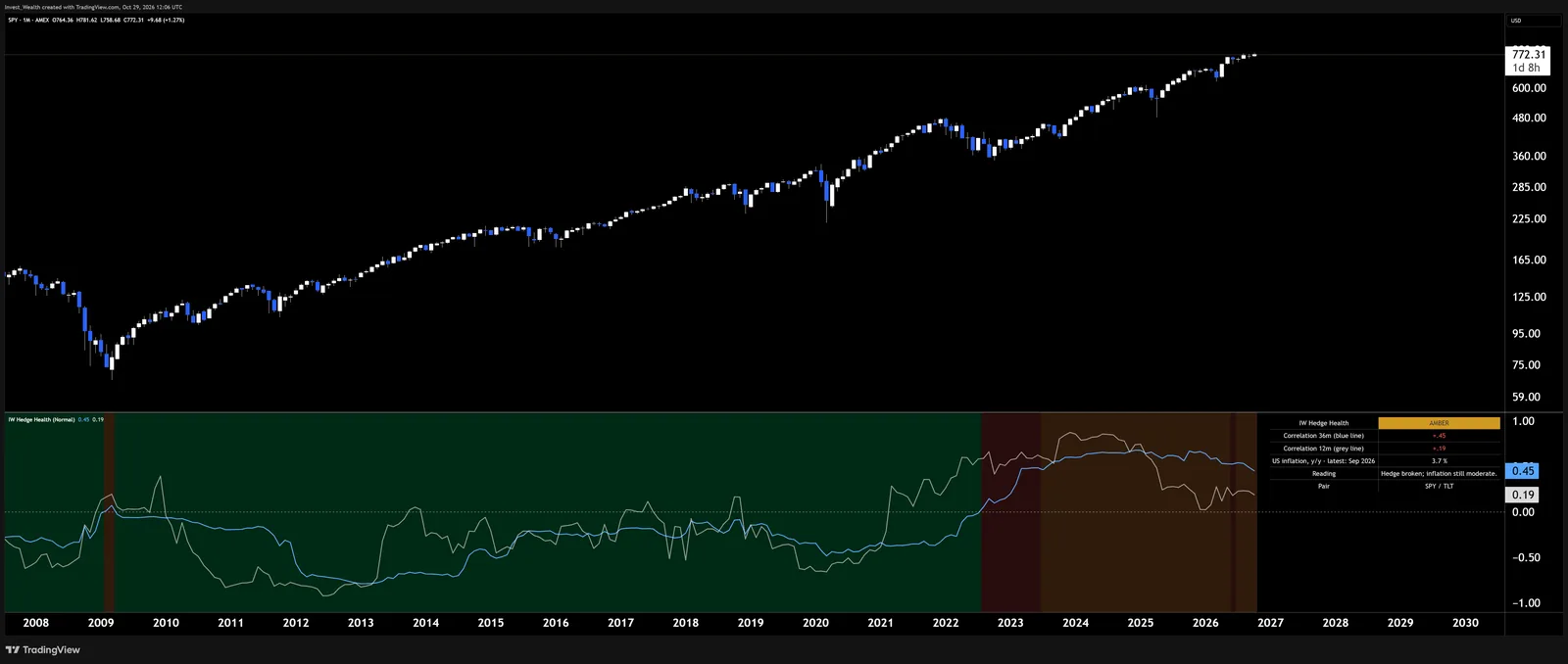
IW Regime Monitor · Hedge Health
Will bonds protect a stock portfolio right now? Rolling stock–bond correlation over two windows plus the latest US inflation reading, combined into GREEN, AMBER or RED: the rule from White Paper No. 1, on your own chart.
How to use it. From 2000 to 2021 the hedge worked (green). In 2022 correlation turned positive with inflation high (red): stocks and bonds fell together. Today: correlation still positive, inflation moderate, AMBER. Alerts on every state change; the Research Terminal shows the same reading.
Start with the Drawdown Meter.
A smaller cousin of Drawdown & Recovery in TradingView's public library: fall from the high, gain needed to recover, time under water, worst fall in the loaded history. Open source, no account needed, works on any symbol.
Open the free Drawdown Meter on TradingView ↗
| Free Drawdown Meter | Suite | |
|---|---|---|
| Drawdown, gain to recover, time under water, worst fall | ✓ | ✓ |
| Staged-buying thresholds with alerts, peak line, longest spell | — | ✓ |
| Trend Stages, Volatility Target, Scoreboard, Regime Monitor | — | ✓ |
| Manual, updates, support by email | — | ✓ |
| Price | free | $169 / year · included in Premium |
Three steps to the first chart.
- Buy, with your TradingView username. You find it in TradingView under your profile picture. Premium members enter it in My Account.
- We unlock the scripts within one working day and email you. They appear under Indicators → Invite-only scripts.
- Add one to a chart. Hover its name for Settings (gear) and Alerts (clock). Tip: Visual order → Bring to front puts labels above the candles. Save the chart layout once; the indicators stay with it.
Recommended charts: daily for stocks and ETFs, weekly for a longer view, monthly for the Regime Monitor. Every table cell and setting has a tooltip that explains it.
What you get
- Cross-Asset Scoreboard and Regime Monitor (Hedge Health)
- Trend Stages, Drawdown & Recovery, Volatility Target
- Alerts for regime, stage, drawdown and volatility changes
- Any symbol, any timeframe, no repainting; light and dark themes
- Updates for the year, release notes on each script page
- Support by email, usually the same day
Card · Apple Pay · Google Pay · PayPal · SEPA
Which TradingView plan do I need?
Any plan, including the free one. Three indicators (Trend Stages, Drawdown & Recovery, Volatility Target) work on every plan. The Scoreboard and the Regime Monitor request data for several symbols at once, which free plans limit; a Pro plan or higher removes that limit.
How do I get access?
Enter your TradingView username at checkout. We add it to the five invite-only scripts within one working day; they then appear in TradingView under Indicators → Invite-only scripts. You get an email when it is done.
Are these the InvestWealth strategies?
No. The indicators use public, textbook measures: trend stages from two averages, drawdown arithmetic, realised volatility, cross-asset momentum and the stock–bond correlation. None of the InvestWealth strategy rules or parameters are in them. They are tools to read the market the way the research does, not signals.
Do they repaint?
No. Every value is calculated from closed bars; nothing changes after the fact. Lengths adapt to the chart timeframe where that makes sense.
Is it a subscription?
Access runs for 12 months from purchase. Two weeks before the end we email a renewal link; nothing renews automatically. Premium members have the suite included for as long as their membership runs.
What is the free Drawdown Meter?
An open-source script in the TradingView public library: fall from the high, gain needed to recover, time under water and the worst fall in the loaded history. The suite version adds the staged-buying thresholds with alerts, the peak line on the price chart and the longest spell under water.
Educational research, not investment advice. Past returns do not guarantee future results. The indicators describe the state of a market; they do not contain the InvestWealth strategies and are not a recommendation to buy or sell. TradingView is a trademark of TradingView, Inc.; InvestWealth is an independent publisher of scripts on its platform.